Usually, I begin every data science project in a Jupyter notebook or a similar tool. Jupyter notebooks are interactive python kernels, where you write code in cells which can be ran in any order. Notebooks provide an HTML view, which allows to see the data and plots rendered in HTML.
They are especially nice, because you can quickly write and verify if the cell written works and then continue working on the next one. If the cell fails you edit it until it works.
This allows for quick verification of code running, viewing the intermediate results and then going on. Also, nice to view plots and read of results and deciding if this is a promising way forward or not. You can also run a small snippet, see if it works and then make it larger, for example useful when doing machine learning.
Personally, I see this quick iterative flow of running a snippet, getting back some results and then moving on to the next as core of data science.
When thinking about using AI for data science and solving ML problems, I wondered if DS/ML can be automated. There are libraries like to do automatic machine learning, due to a good amount of optimization are able beat humans on Kaggle competitions. However, afaik, auto ml doesn’t really look into and understand data. So, it needs help to come up with features or discover certain intricacies.
I remember watching a video from Andrei Karpathy, where he said something along the lines of
The first step to training a neural network is to not touch any neural network code at all and instead begin by thoroughly inspecting your data. This step is critical.
In that video he was going through examples of CIFAR images that the neural network failed to classify correctly and showed that these samples generally were actually confusing even to a human, or even mislabeled. And this suggestion really stuck with me. When doing explorative data analysis, I’d go to an extent of analyzing every sample there is, trying to notice some pattern between them and figure out why the model succeeds on some samples and fails on others.
So, when I think of AI doing DS/ML, what I really expect is this level of rigor, trying to figure out why something is happening to the point of looking through each sample.
Using ai assisted coding is the go to solution in development now. Using AI for data science is rather not trivial. Jupyter notebooks, are actually json files, with code and results saved in it. So, if an agent tries to directly edit the code, with no assistance, it has to read the whole or part of a json which 1) fills up it’s context window 2) it has to output a correct json, which is not easy for LLMs.
A way to assist an agent is to give it a tool. Tool calls are a way for LLMs to execute certain functionality instead of doing it in itself as a transformer.
I’ve been a user of VScode Copilot since it’s release and when tool calls became popular, they were one of the first ones to release tools for Copilot to interact with Jupyter notebooks inside VScode. I got excited to try it out, but was disappointed quickly. Copilot would take an unusual amount of time trying to edit the notebook. It would fail to run a cell, or maybe forget to run it. Sometimes it would spit out a whole notebook in a single cell or create a whole notebook without running.
I don’t want it to just spit out a complete notebook. The problem with that is that it’s a generic script, which was generated based on context it knew about the task, which is not much. It’s basically a template, but no real analysis or thinking about the data didn’t happen.
AlphaEvolve – is a Gemini based evolutionary algorithm to solve problems. It runs multiple agents in an environment where the agent can try to solve the task and then gets evaluated. Their scores are their fitness, and the best solutions get cross mutated and ran again. There is also some sort of mutation introduced. In a traditional, evolutionary algorithm, type fashion the solutions evolve and achieve subliminal results.
Deep Mind showed impressive results by in challenges like speeding up their kernels and finding an algorithm to compute 4x4 matrix products in less steps then previous best.
This framework is limited to tasks where there is a clear input and output, and they can be evaluated. Which is perfect for DS/ML tasks and Kaggle like competitions. I really thought that there would be a tool, which iterates over data, making new hypothesis and run again and again until it achieves better than human results. LLMs are capable of “reasoning” and acting based on outputs, so naturally they should have been able to “solve” DS/ML and dominate Kaggle competitions.
However, since the announcement of AlphaEvolve, there was nothing mentioned about it after. There were opensource copies like OpenEvolve, but honestly, this is not cheap to run, so I ditched the idea.
Fast forward to February 2026.
My style has changed. Instead of Jupyter notebooks I use plain python files because they are easier to review in git, others can understand, and you don’t need Jupyter or special tooling to read or run it. The files are still split like cells, but using comments, so it still can be interacted with like a notebook, cell by cell.
Another style change is my preference for using pure functions and pipes to process data. I’ve seen this style in language R, and it impressed me by how clean the data preprocessing becomes – just a pipeline and easy for others to understand, the small functions act like cells separating the code and also describing what it does. Another nice benefit is to be able to just copy the function from discovery notebooks into a production like workflow.
That month, I participated in the AI Cup 2026. The challenge was to predict bird types from their flight trajectories. Honestly, I missed doing classical data science competitions and not having to organize this one, and having low pressure, and my friends also participating, I decided to see if I still got it and see how far can I get.
To make it new for myself, I decided the goal to be to develop a way of doing DS/ML using AI and see how far can I get. And even if I don’t win, I’d develop a cool method to use.
When coming up with the method, I wanted it to use already existing functionality in coding agents like read/write files, execute bash commands or other tool calls. I didn’t want to end up in the same pitfalls as VScode Copilot, creating complete files without feedback on how it’s doing.
So, I opted to running python snippets. You can do that in the terminal like so
python -c "print('Hello World!')"and I’ve seen my agents use such a pattern when I tell them to do move files using python, instead of manual move tool, or worse write tool, they have. This pattern should be rather familiar to them.
And for the prompt I opted for something like this:
python -c "
import pandas as pd, numpy as np
...
print('result:', round(value, 4))
"
After, it was a matter of coming up with a prompt. The outline was something like:
- Analyse the data
- Come up with a hypothesis
- Use the python snippet command (above) to test it
- Iterate until you figure it out
So, the loop would look like this:
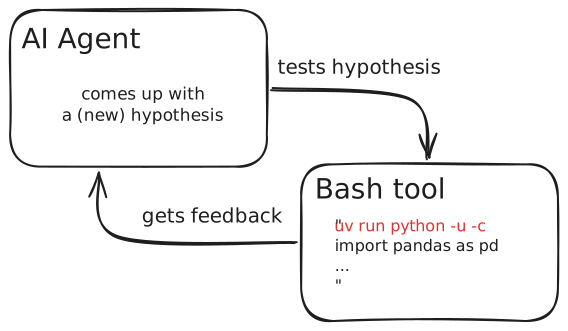
A few other ideas I sprinkled in were to use statistical tests to introduce rigor, and CV if doing machine learning. Ablation studies to see if we actually improve. Use short code snippets. Check one thing at a time. Iterate and see. Always print an output.
I ran cursor’s /create-skill which made the skill I used (full file here).
---
name: Analysis
description: Analyse the problem and come up with a hypothesis, write a snippet to test it, and measure the result.
---

# Hypothesis-Driven Analysis & Model Debugging

You are doing empirical ML debugging. Follow this loop: **hypothesize → snippet → measure → conclude → iterate**.

---

## The Loop

### 1. Form a hypothesis first
Before writing any code, state explicitly:
- What you think the problem is
- What metric/output would confirm or disprove it

### 2. Write a focused Python snippet

Keep snippets short and self-contained. Always print numbers — never just "it ran".

```python
uv run python -c "
import pandas as pd, numpy as np
...
print('result:', round(value, 4))
"
```.

**Rules:**
- One question per snippet
- Print the key number at the end
- If comparing two things, print both on the same line

### 3. Read the result and conclude

After seeing output, explicitly state:
- ✓ hypothesis confirmed / ✗ hypothesis rejected
- What this implies for the next step

### 4. Iterate or escalate

- If confirmed: implement the fix, measure again
- If rejected: form a new hypothesis
- If uncertain: design a more targeted test
Using this analysis skill, I found a few interesting facts about the data, which I would have trouble figuring out myself.